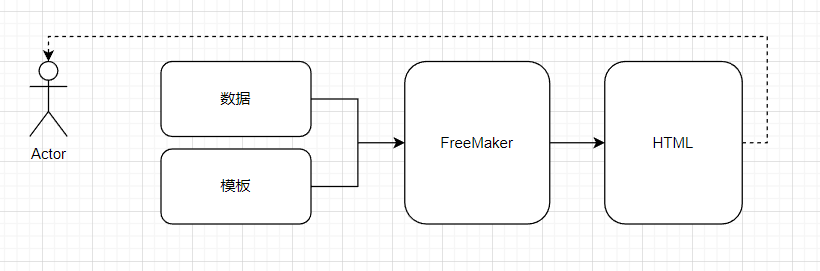
FreeMarker是一款免费的Java模板引擎,是一种基于模板和数据生成文本(HMLT、电子邮件、配置文件、源代码等)的工具,它不是面向最终用户的,而是一款程序员使用的组件
| 模板引擎 | thymeleaf | freemaker | velocity |
github : https://github.com/apache/freemarker
引入依赖
<dependency>
  <groupId>org.freemarker</groupId>
  <artifactId>freemarker</artifactId>
  <version>2.3.32</version>
</dependency>
常用指令命令
assign 自定义变量指令
<#--
	assign 自定义变量指令
		语法:
			<#assign 变量名=值>
			<#assign 变量名=值 变量名=值> (定义多个变量)
-->
<#assign str="hello">
${str} <br>
<#assign num=1 names=["zhangsan","lisi","wangwu"] >
${num} -- ${names?join(",")}
if elseif else 逻辑判断指令
<#--
   if, else, elseif 逻辑判断指令
   	格式:
   	<#if condition>
   			...
   		<#elseif condition2>
   			...
   		<#elseif condition3>
   			...
   		<#else>
   			...
   	</#if>
   	注:
   		1. condition, condition2等:将被计算成布尔值的表达式。
   		2. elseif 和 else 指令 是可选的。
-->
<#assign score = 80>
<#if score < 60>
   你个小渣渣!
   <#elseif score == 60>
   	分不在高,及格就行!
   <#elseif score gt 60 && score lt 80>
   	哎哟不错哦!
   <#else>
   	你很棒棒哦!
</#if>
<br>
<#-- 判断数据是否存在 -->
<#assign list="">
<#if list??>
   数据存在
   <#else>
   	数据不存在
</#if>
list 遍历指令
<#--
    list指令
        格式1:
            <#list sequence as item>
            </#list>
        格式2:
            <#list sequence as item>
            <#else>
                当没有选项时,执行else指令
            </#list>
        注:
            1. else 部分是可选的
            2. sequence: 想要迭代的项,可以是序列或集合的表达式
            3. item: 循环变量 的名称
            4. 当没有迭代项时,才使用 else 指令, 可以输出一些特殊的内容而不只是空在那里
-->
<#assign users = ["张三","李四","王五"]>
<#-- 遍历序列 -->
<#list users as user>
    ${user}
</#list>
<br>
<#--判断数据不为空,再执行遍历 (如果序列不存在,直接遍历会报错)-->
<#if users2??>
    <#list users2 as user>
        ${user}
    </#list>
</#if>
<br>
<#assign users3 = []>
<#-- 当序列没有数据项时,使用默认信息 -->
<#list users3 as user>
    ${user}
<#else>
    当前没有数据!
</#list>
macro 自定义指令宏
<#--
macro 自定义指令 (宏)
1. 基本使用
格式:
<#macro 指令名>
指令内容
</#macro>
使用:
<@指令名></@指令名>
2. 有参数的自定义指令
格式:
<#macro 指令名 参数名1 参数名2>
指令内容
</#macro>
使用:
<@指令名 参数名1=参数值1 参数名2=参数值2></@指令名>
注:
1. 指令可以被多次使用。
2. 自定义指令中可以包含字符串,也可包含内置指令
-->
<#-- 定义基本的自定义指令 -->
<#macro address>
© 1999–2015 The FreeMarker Project. All rights reserved.
</#macro>
<#-- 使用指令 -->
<@address></@address> <br>
<@address></@address>
<hr>
<#-- 定义有参数的自定义指令 -->
<#macro queryUserByName uname>
通过用户名查询用户信息 - ${uname}
</#macro>
<#-- 使用指令,并传递参数 -->
<@queryUserByName uname="admin"></@queryUserByName> <br>
<#-- 定义有多个参数的自定义指令 -->
<#macro queryUserByParams uname uage>
通过多个餐宿查询用户信息 - ${uname} - ${uage}
</#macro>
<#-- 使用指令,并传递多个参数 -->
<@queryUserByParams uname="admin" uage=18></@queryUserByParams> <br>
<hr>
<#-- 自定义指令中包含内置指令 -->
<#macro cfb>
<#list 1..9 as i>
<#list 1..i as j>
${j}*${i}=${j*i}
</#list>
<br>
</#list>
</#macro>
<@cfb></@cfb>
<@cfb></@cfb>
<#-- 动态数据 -->
<#macro cfb2 num>
<#list 1..num as i>
<#list 1..i as j>
${j}*${i}=${j*i}
</#list>
<br>
</#list>
</#macro>
<@cfb2 num=5></@cfb2>
nested 占位指令
nested 指令执行自定义指令开始和结束标签中间的模板片段。嵌套的片段可以包含模板中任意合法的内容。
<#--
    nested 占位指令
        nested 相当于占位符,一般结合macro指令一起使用。
        可以将自定义指令中的内容通过nested指令占位,当使用自定义指令时,会将占位内容显示。
-->
<#macro test>
    这是一段文本!
    <#nested>
    <#nested>
</#macro>
<@test><h4>这是文本后面的内容!</h4></@test>
import 导入指令
import 指令可以引入一个库。也就是说,它创建一个新的命名空间, 然后在那个命名空间中执行给定路径的模板。可以使用引入的空间中的指令。
新建commons.ftl文件
commons.ftl
<#macro cfb>
<#list 1..9 as i>
<#list 1..i as j>
${j}*${i}=${j*i}
</#list>
<br>
</#list>
</#macro>
在其他ftl页面中通过import导入commons.ftl的命名空间,使用该命名空间中的指令
f03.ftl
<#-- 导入命名空间 -->
<#import "commons.ftl" as common>
<#-- 使用命名空间中的指令 -->
<@common.cfb></@common.cfb>
include 包含指令
可以使用 include 指令在你的模板中插入另外一个 FreeMarker 模板文件 。 被包含模板的输出格式是在 include 标签出现的位置插入的。 被包含的文件和包含它的模板共享变量,就像是被复制粘贴进去的一样。
<#--包含指令(引入其他页面文件) include-->
<#--html文件-->
<#include "test.html">
<#--freemarker文件-->
<#include "test.ftl">
<#--text文件-->
<#include "test.txt">
运算符
算术运算符
<!--
	算术运算
		+、-、*、/、%
-->
<#assign a1 = 8 a2 = 2 >
${a1} + ${a2} = ${a1 + a2} <br/>
${a1} - ${a2} = ${a1 - a2} <br/>
${a1} * ${a2} = ${a1 * a2} <br/>
${a1} / ${a2} = ${a1 / a2} <br/>
${a1} % ${a2} = ${a1 % a2} <br/>
<!--字符串运算-->
${"hello" + "," + "freemarker"}
逻辑运算符
<#--
	逻辑运算符
		&&、||、!
-->
比较运算符
<#--
	比较运算符
		> (gt): 大于号,推荐使用 gt
		< (lt): 小于号,推荐使用 lt
		>= (gte): 大于等于, 推荐是用 gte
		<= (lte): 小于等于,推荐使用 lte
		== : 等于
		!= : 不等于
-->
空值运算符
<#--
	空值运算符
		1. ??:判断是否为空,返回布尔类型
		如果不为空返回 false, 如果为空返回 true,不能直接输出
		${(name??)?string}
	2. !: 设置默认值,如果为空,则设置默认值
		1. 设置默认为空字符串:
		${name!}
		2. 设置指定默认值
		${name!'zhangsan'}
-->