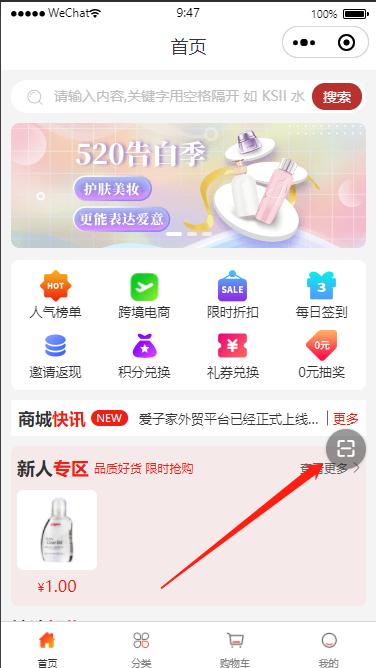
调用
<!-- 悬浮球-扫一扫 -->
<drag-button @btnClick="scanShop" :isDock="true">
   <u-icon name="scan" style="font-size: 40rpx;"></u-icon>
</drag-button>
<!-- 悬浮球-扫一扫 -->
组件代码
components/drag-button.vue
<template>
	<view>
		<view
			id="_drag_button"
			class="drag"
			:style="'left: ' + left + 'px; top:' + top + 'px;'"
			@touchstart="touchstart"
			@touchmove.stop.prevent="touchmove"
			@touchend.stop="touchend"
			@click.stop.prevent="click"
			:class="{ transition: isDock && !isMove }"
		>
			<slot><text>{{ text }}</text></slot>
		</view>
	</view>
</template>

<script>
export default {
	name: 'drag-button',
	props: {
		isDock: { // 是否自动贴边
			type: Boolean,
			default: false
		},
		existTabBar: {
			type: Boolean,
			default: false
		}
	},
	data() {
		return {
			top: 0,
			left: 0,
			width: 0,
			height: 0,
			offsetWidth: 0,
			offsetHeight: 0,
			windowWidth: 0,
			windowHeight: 0,
			isMove: true,
			edge: 10,
			text: '公告' //此处自定义按钮文字(1-3个汉字)
		};
	},
	mounted() {
		const sys = uni.getSystemInfoSync();

		this.windowWidth = sys.windowWidth;
		this.windowHeight = sys.windowHeight;

		// #ifdef APP-PLUS
		this.existTabBar && (this.windowHeight -= 50);
		// #endif
		if (sys.windowTop) {
			this.windowHeight += sys.windowTop;
		}
		// console.log(sys);
		const query = uni.createSelectorQuery().in(this);
		query
			.select('#_drag_button')
			.boundingClientRect(data => {
				this.width = data.width;
				this.height = data.height;
				this.offsetWidth = data.width / 2;
				this.offsetHeight = data.height / 2;
				this.left = this.windowWidth - this.width - this.edge;
				this.top = ((this.windowHeight - this.height - this.edge) * 3) / 4;
			})
			.exec();
	},
	methods: {
		click() {
			this.$emit('btnClick');
		},
		touchstart(e) {
			this.$emit('btnTouchstart');
		},
		touchmove(e) {
			// 单指触摸
			if (e.touches.length !== 1) {
				return false;
			}

			this.isMove = true;

			this.left = e.touches[0].clientX - this.offsetWidth;

			let clientY = e.touches[0].clientY - this.offsetHeight;
			// #ifdef H5
			clientY += this.height;
			// #endif
			let edgeBottom = this.windowHeight - this.height - this.edge;

			// 上下触及边界
			if (clientY < this.edge) {
				this.top = this.edge;
			} else if (clientY > edgeBottom) {
				this.top = edgeBottom;
			} else {
				this.top = clientY;
			}
		},
		touchend(e) {
			if (this.isDock) {
				let edgeRigth = this.windowWidth - this.width - this.edge;

				if (this.left < this.windowWidth / 2 - this.offsetWidth) {
					this.left = this.edge;
				} else {
					this.left = edgeRigth;
				}
			}

			this.isMove = false;

			this.$emit('btnTouchend');
		}
	}
};
</script>

<style lang="scss">
.drag {
	display: flex;
	justify-content: center;
	align-items: center;
	background-color: rgba(0, 0, 0, 0.4);
	box-shadow: 0 0 6upx rgba(0, 0, 0, 0.3);
	color: $uni-text-color-inverse;
	width: 80upx;
	height: 80upx;
	border-radius: 50%;
	position: fixed;
	z-index: 99;

	&.transition {
		transition: left 0.3s ease, top 0.3s ease;
	}
}
</style>